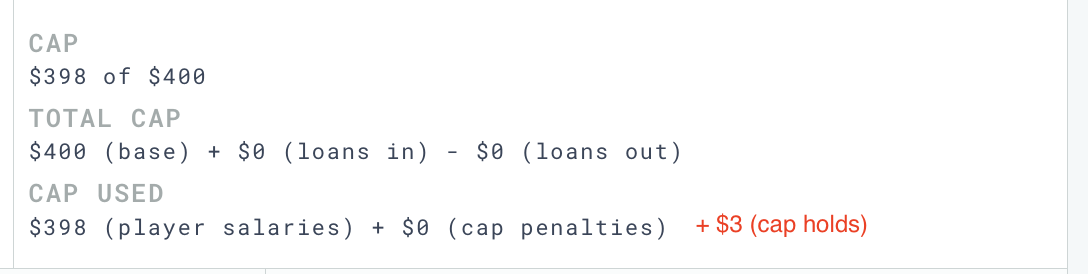
That said, we just had our annual situation in the league where someone forgets about their cap holds and accidentally goes over the cap. Clearly in the rules/each player is responsible for understanding, but I feel this could be largely avoided if cap holds ($1/open roster slot) were shown in the UI and included in the Salary Cap Used. Really dumb mockup image attached - would this be easy to implement?
This is a wishlist request and it should be posted to that forum. I’ve moved it.
related, I would recommend reading the best practices for this forum and kind of request- Wishlist best practices
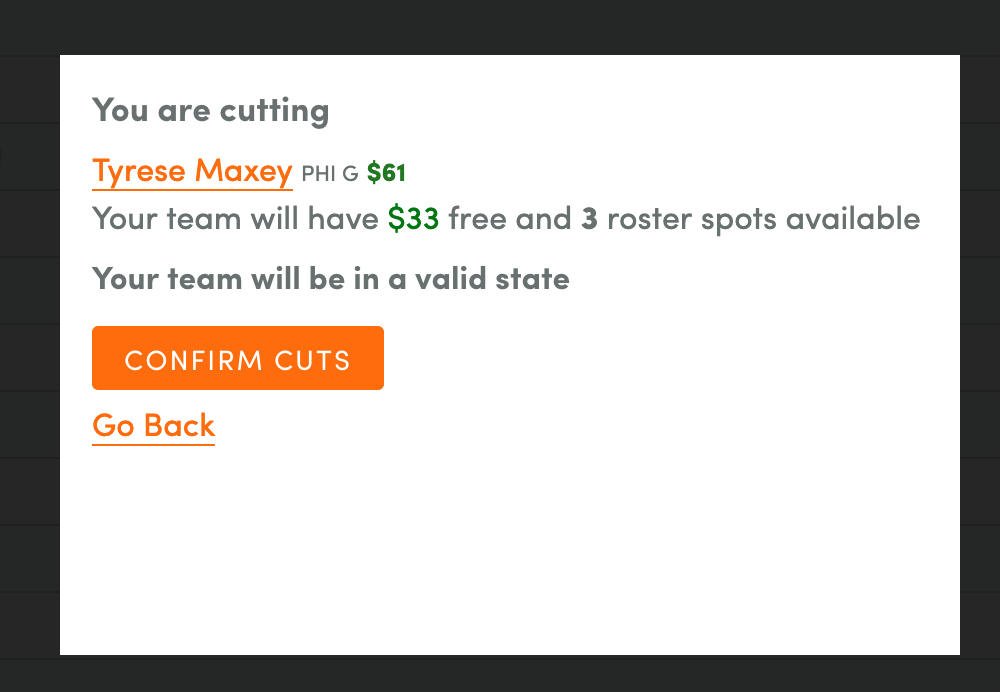
If your team is in an illegal state and you have to cut someone, you go to the cut page to cut someone and, when you try to cut someone, you will see a popup. Here is an example:
Noted on the Wishlist and best practices - it’s been a while since I’ve posted and that’s new. My bad there.
Further - this didn’t happen to me, I took my lumps a few years ago and learned from it. It occurred to someone when they won an auction that put them over the cap due to $1/slot holds they didn’t understand. Not something they would have seen the pop up for until they had to fix something/change their roster significantly.
While I recognize this isn’t super high priority/you’ve got other things to take care of, and in the flavor of the best practices/being solution-agnostic:
-Currently it is not intuitive to understand where you stand in relation to the overall cap limit because the $1/unused roster slot is not in the calculations of your Cap Used. Making this more intuitive would be helpful.
-This has been an issue almost every year I’ve been in the league for someone
-While my mockup might be annoying, this seemingly small element can have big consequences re: roster construction and a week’s matchup, some type of fix would be appreciated.
In both cases I used the word “you” to mean “anyone”, not specifically you.
When one cuts a player, one should see if their team will be valid. If one does not understand why their team is in an invalid state, one will learn the rules once ever, either from light guidance from a league member or by reading the rules page. I think that’s a fine solution for something that is not really a repeated problem once one learns the rule. Getting guidance from league mates is good for league health, and reading the rules page is also good.
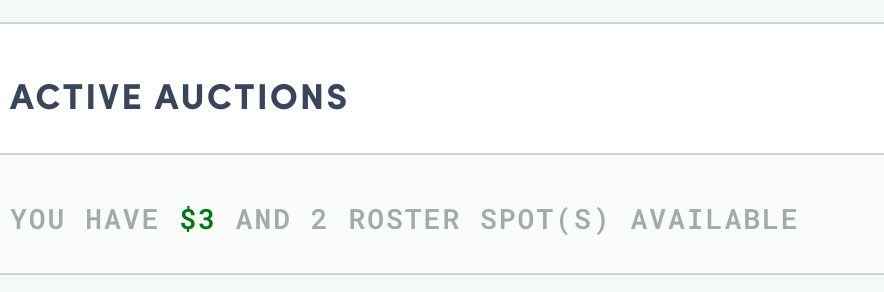
When people run into this issue in your league every year, how long does it take to explain the rule? When does it occur, when adding a player or when cutting and not freeing enough space? If the latter, I think the cut pop-up does a very good job of guiding one. If it is a problem during bidding, we have this:
And of course, when bidding, one is allowed to go over limits, as long as one fixes them when they cut. So, I think the action point has to be on cut, and I think being extremely explicit about if the proposed cut will put the team in a valid state is important there. Doing much more than that is clutter and works from the assumption that one didn’t read the valid/invalid sentence when cutting.
I might be missing an entire scenario here, which is why I wrote this stuff out. The ask feels like clutter on an already busy page, and not particularly helpful relative to the valid/invalid state in the cut pop-up. Like I mentioned in the best practices post, I need to understand the why a lot more than the what and I don’t see the why here yet.
Got it and makes sense. First - really appreciate the engagement!
As to the issue, and whether the current pop up language in cuts/auctions suffices:
-My thinking is that when one is planning for their team, one often looks at the top of the Roster page to think about trades, auctions, cuts, etc.
-When one looks at that top bar, one assumes that the 3 lines (Cap, Total Cap, Cap Used) are comprehensive, and that there’s nothing else one needs to consider
-As a result, one often forgets to factor in unused roster spot cap holds into the equation. Oftentimes this doesn’t matter, but - when money gets very tight, it can make a difference.
Not sure I’m explaining this super well. @mmitchell311 any chance you can chime in to clarify?
(there’s a separate consideration with the rules page language, which states “the team will be locked out of normal activities until a player is cut or moved off the team via trade.” But then - one cannot accept or propose a trade while in an invalid state…limiting that ‘moved off the team via trade’ to only apply to a trade executed but pending prior to entering an invalid state)
I’m happy to jump in here. I definitely like the addition of “via pending trade” to the rules just to help clarify.
I think in terms of the underlying request - I think I would phrase it something like this “somebody who is less familiar with the rules (or might be doing something quickly and not quite thinking) can very easily go over the cap with an auction”
In the draft, there is some code that prevents you from putting your team in an invalid spot. But that doesn’t exist with auctions outside the draft. I think this makes sense, because I don’t think you can cut during the draft, so you wouldn’t be able to get your team out of the invalid state. But you can do quickly address it after a regular auction.
So when there is an auction you are interested in, the info you see is “YOU HAVE $3 AND 2 ROSTER SPOT(S) AVAILABLE” on top of the Active Auctions page or “ROSTER - 23 of 25, CAP - $397 out of $400” on top of the team page. So I think that for somebody newer, or is not thinking enough, you might make the mistake of thinking “I can bid $3 for somebody, and I have the roster space to add them”, and then you would put your roster in an invalid state if you won an auction for $3.
I agree that generally after you do that once, you probably won’t do it again. And then once you have done it, the Cut page is very clear on whether a move would get you back to valid, so no issues there. But there could be some small tweaks in the language to help people understand their max bid on an auction without going over the cap.