# Add Non-Rostered Player Entry to the Roster Organizer
**URL:** https://community.ottoneu.com/t/add-non-rostered-player-entry-to-the-roster-organizer/2498
**Category:** Wishlist
**Tags:** wishlist
**Created:** [November 17, 2017, 6:44pm UTC](https://community.ottoneu.com/t/add-non-rostered-player-entry-to-the-roster-organizer/2498 "2017-11-17T18:44:49Z")
**Posts on this page:** 8
**Page:** 1
### Author:  [@Henry.Woodbury](https://community.ottoneu.com/u/Henry.Woodbury)
#### Post date: [November 17, 2017, 6:44pm UTC](https://community.ottoneu.com/t/add-non-rostered-player-entry-to-the-roster-organizer/2498/1 "2017-11-17T18:44:49Z")
The Roster Organizer works great for players on my roster. What I’d like is the ability to add additional player + salary rows to any of the categories for players not on my roster. A simple name text field and numeric salary field would work fine. That way I could put in trade or free agent targets and see how my roster and salary would be impacted.
---
### Author:  [@vibbot](https://community.ottoneu.com/u/vibbot)
#### Post date: [November 17, 2017, 9:25pm UTC](https://community.ottoneu.com/t/add-non-rostered-player-entry-to-the-roster-organizer/2498/2 "2017-11-17T21:25:51Z")
You can already do that, can’t you? Click on “Click to add a Target” and you can put in a player name and salary, and the totals update accordingly.
---
### Author:  [@nivshah](https://community.ottoneu.com/u/nivshah)
#### Post date: [November 18, 2017, 12:26am UTC](https://community.ottoneu.com/t/add-non-rostered-player-entry-to-the-roster-organizer/2498/3 "2017-11-18T00:26:31Z")
I’m v concerned a hardcore user like @Henry.Woodbury doesn’t know about the Targets functionality of the Roster Organizer…
---
### Author:  [@GRPhilipp](https://community.ottoneu.com/u/GRPhilipp)
#### Post date: [November 18, 2017, 12:40am UTC](https://community.ottoneu.com/t/add-non-rostered-player-entry-to-the-roster-organizer/2498/4 "2017-11-18T00:40:50Z")
I can’t speak for @Henry.Woodbury, but I have been occasionally puzzled by how to use the Targets feature. The interface was a little cryptic to me. On a PC, I see this:

I have to scroll down within that mini pop-up window to see the Budget field and the Save/Cancel buttons. Depending on the width of my browser window, sometimes the vertical scroll bar isn’t visible. On mobile, it’s somewhat less apparent that important stuff is hidden down below. Maybe these are just quirks that result from my particular PC/Browser/etc.
---
### Author:  [@nivshah](https://community.ottoneu.com/u/nivshah)
#### Post date: [November 18, 2017, 1:00am UTC](https://community.ottoneu.com/t/add-non-rostered-player-entry-to-the-roster-organizer/2498/5 "2017-11-18T01:00:53Z")
Clear your cache or make sure you have the freshest JS - I actually addressed some of these issues yesterday while I was working on something else.
---
### Author:  [@GRPhilipp](https://community.ottoneu.com/u/GRPhilipp)
#### Post date: [November 18, 2017, 5:59am UTC](https://community.ottoneu.com/t/add-non-rostered-player-entry-to-the-roster-organizer/2498/6 "2017-11-18T05:59:03Z")
Thanks for responding and for having modified it. Here’s what I get now on PC/Chrome:
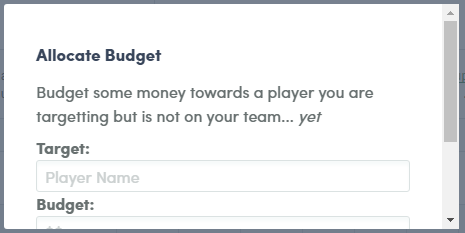
Seems a bit better. The need to scroll down is more apparent. I assume there is some constraint that prevents you from enlarging the pop-up window to eliminate the vertical scrolling.
---
### Author:  [@nivshah](https://community.ottoneu.com/u/nivshah)
#### Post date: [November 18, 2017, 1:38pm UTC](https://community.ottoneu.com/t/add-non-rostered-player-entry-to-the-roster-organizer/2498/7 "2017-11-18T13:38:38Z")
I was just being a little simplistic in my window sizes - I’ve updated this further and scrolling should no longer be required on this pop-up.
I hope this helps with the original post!
---
### Author:  [@Henry.Woodbury](https://community.ottoneu.com/u/Henry.Woodbury)
#### Post date: [November 22, 2017, 10:43pm UTC](https://community.ottoneu.com/t/add-non-rostered-player-entry-to-the-roster-organizer/2498/8 "2017-11-22T22:43:34Z")
Well duh. That’s what “click to add target” means. I never clicked it.